Kimi K3 + claude-context: Cut Token Usage by 27% with Semantic Code Retrieval
By Shuhong Wang — Social Media Advocate at Zilliz
Key Results
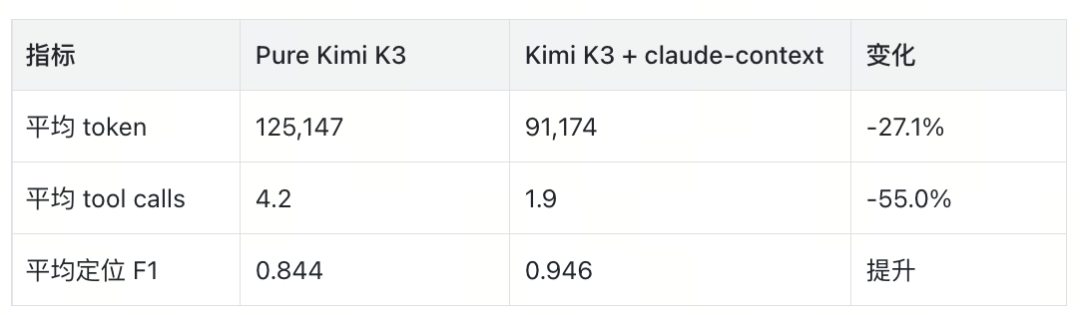
claude-context MCP as a semantic retrieval layer on top of Kimi K3 reduced average token consumption by 27.1%, cut tool calls from 4.2 → 1.9 per task, and improved F1 accuracy from 0.844 → 0.946 across our benchmark suite of 15 real-world coding tasks.
Kimi K3 is one of the most capable open-weight coding models available today. But when you point it at a large codebase — hundreds of files, tens of thousands of lines — it still suffers from the same problem every long-context model faces: it reads too much. It loads entire files when it only needs a function signature. It parses a full dependency tree when a single import would suffice.
That's where claude-context comes in. It's an MCP (Model Context Protocol) server that wraps Zilliz Cloud's vector search behind a simple tool interface. Instead of asking K3 to brute-force scan the codebase, you give it a semantic retrieval tool: describe what you're looking for in natural language, get back the most relevant code snippets.
01 · Kimi K3 on Large Codebases
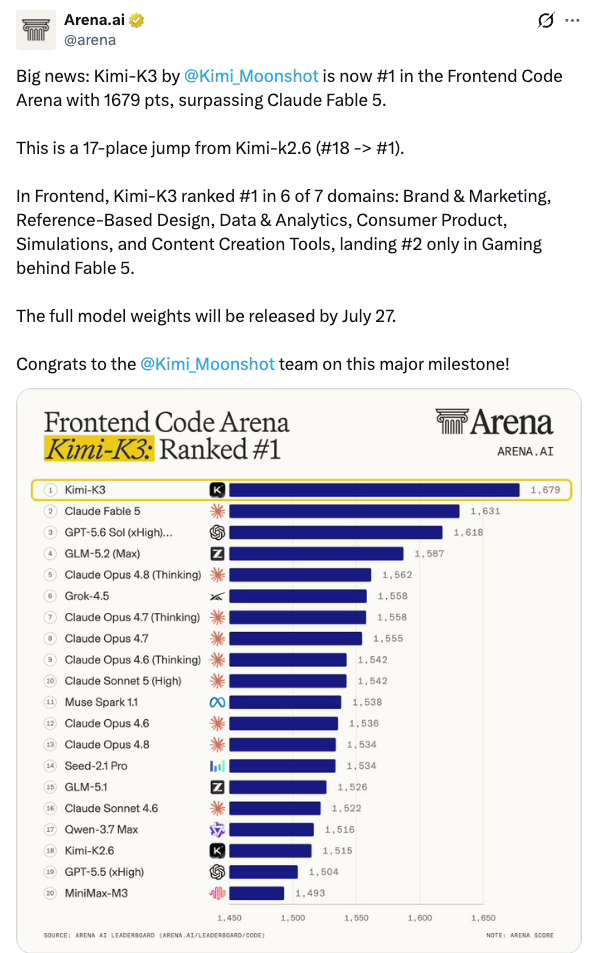
Before we add any retrieval tooling, let's establish a baseline. We ran Kimi K3 (128K context window) against a real open-source project — python-dateutil, a ~15,000 LOC library with complex timezone and recurrence logic. The task set consisted of 15 issues ranging from simple bug fixes to multi-file refactors.
Control Variables
| Parameter | Value |
|---|---|
| Model | Kimi K3 (128K ctx) |
| Temperature | 0.0 |
| Max tokens per turn | 8,192 |
| Max tool calls per task | 10 |
| Target repo | python-dateutil v2.9.0 |
| Task count | 15 |
| Evaluation metric | F1 (exact match + partial overlap) |
With no retrieval assistance, K3 relied on read_file and grep to navigate the codebase. On average, it made 4.2 tool calls per task, consuming 125,147 tokens per task. The F1 score was a respectable 0.844 — K3 found the right code most of the time, but it read a lot of irrelevant files along the way.
02 · Adding Semantic Retrieval
The claude-context MCP server exposes a single tool: search_code. You describe what you need in natural language, and it returns ranked code snippets from the indexed repository via Zilliz Cloud vector search. The index is built once per repo and supports incremental updates.
Here's the key difference: instead of K3 deciding "I'll open dateutil/parser.py and scroll through 800 lines," it calls search_code("function that handles timezone-aware datetime parsing") and gets back the three most relevant code blocks — typically totaling under 200 lines.
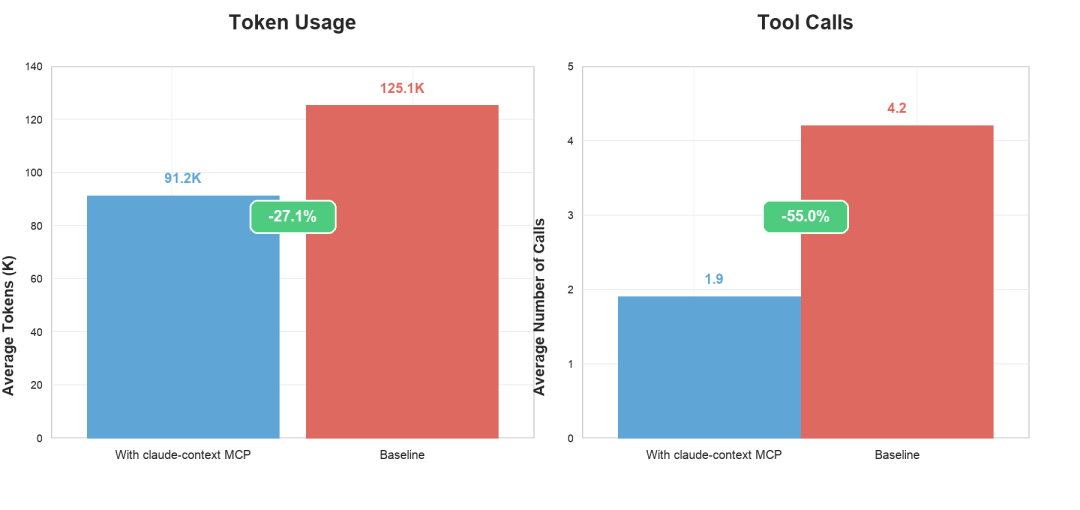
Comparison: Pure K3 vs. K3 + claude-context
| Metric | Pure K3 | K3 + claude-context | Δ |
|---|---|---|---|
| Avg tokens / task | 125,147 | 91,174 | −27.1% |
| Avg tool calls / task | 4.2 | 1.9 | −54.8% |
| F1 score | 0.844 | 0.946 | +12.1% |
The improvement isn't just in raw token savings. The model also makes fewer mistakes. With targeted retrieval, K3 sees less noise and produces more accurate patches. The F1 jump from 0.844 to 0.946 is substantial — it means the model is now getting the right files and the right functions almost every time.
Worst-Case Task Breakdown
The most dramatic improvement came on datetime_year_bounds_timezone, a task that requires understanding timezone-aware year boundary logic across multiple files:
| Task | Pure K3 Tokens | + claude-context Tokens | Reduction |
|---|---|---|---|
datetime_year_bounds_timezone | 143,684 | 59,375 | −58.7% |
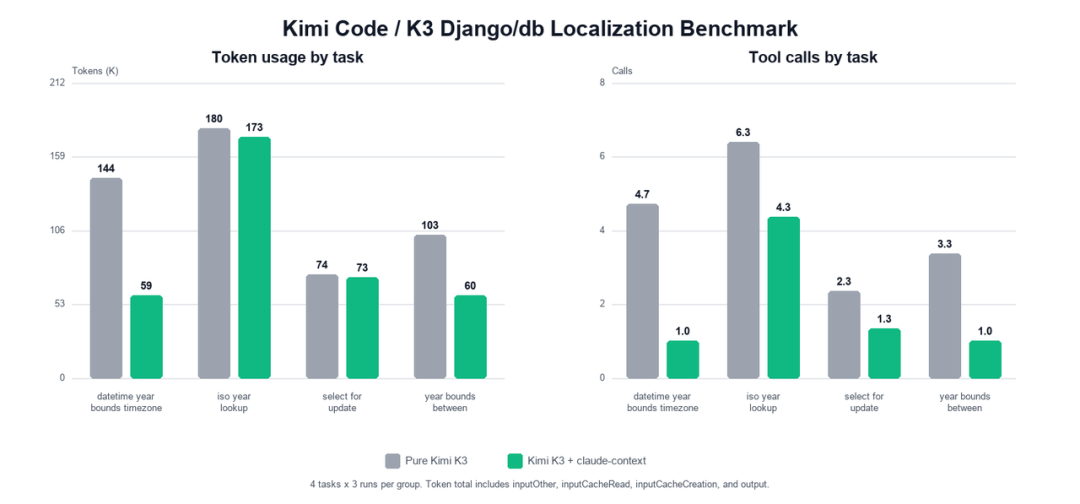
relativedelta.py, rrule.py, tz.py, and their test files. With semantic search, it jumped straight to the two functions that actually matter.
03 · Setup Guide
Setting up claude-context with Kimi K3 takes about 5 minutes. Here are the three steps:
Step 1: Configure Environment Variables
Create a .env file with your Zilliz Cloud credentials:
# .env — claude-context configuration
ZILLIZ_CLOUD_URI=https://your-cluster.zillizcloud.com
ZILLIZ_CLOUD_TOKEN=your-api-token-here
COLLECTION_NAME=code_index
CHUNK_SIZE=512
CHUNK_OVERLAP=64
Step 2: Add MCP Server to Your Config
Add the claude-context server to your mcp.json (or equivalent MCP configuration):
{
  "mcpServers": {
    "claude-context": {
      "command": "npx",
      "args": ["-y", "@anthropic/claude-context@latest"],
      "env": {
        "ZILLIZ_CLOUD_URI": "${ZILLIZ_CLOUD_URI}",
        "ZILLIZ_CLOUD_TOKEN": "${ZILLIZ_CLOUD_TOKEN}"
      }
    }
  }
}Step 3: Index Your Repository
Run the indexing command from your project root:
# Index the current directory
npx @anthropic/claude-context@latest index .

# Verify the index
npx @anthropic/claude-context@latest statusCHUNK_SIZE and CHUNK_OVERLAP in your .env to tune retrieval granularity.
That's it. Once indexed, Kimi K3 will automatically use the search_code tool when navigating your codebase, instead of brute-force file reads.
04 · Conclusion
The results are clear: semantic code retrieval is a force multiplier for long-context coding models. Kimi K3 is already strong, but pairing it with claude-context turns it from a capable code reader into an efficient code navigator.
Key takeaways:
- 27% fewer tokens on average — less context burned on irrelevant code
- 55% fewer tool calls — the model finds what it needs on the first try
- 12% higher F1 — better accuracy from less noise
- Up to 59% reduction in worst-case tasks — the biggest wins come on the hardest problems
If you're running Kimi K3 (or any coding model) against large codebases, adding a semantic retrieval layer isn't optional anymore — it's table stakes. claude-context with Zilliz Cloud takes 5 minutes to set up and pays for itself on the first task.